Google AI Max Explained

Hey there 🧠
Ready for another day of staying ahead of the competition in the Growth race?
Oh and before we go ahead! If your friend sent this to you, be sure to subscribe here! So you don’t miss out on any editions.
Partnership with Finance Buzz
Pay no interest until 2027 while earning cash back with this top card

Meet the balance transfer card experts are obsessing over. It won’t charge you interest on balance transfers until 2027. Plus, you’ll earn up to 5% cash back on qualifying purchases.
Check out these cards today so you can focus on planning your next trip!
💡 How to Tell If Google’s AI Max for Search Is Actually Working
AI Max has been stirring up the PPC world ever since it entered beta, and with budgets on the line, advertisers want to know one thing: Is it actually adding value? Google Ads Liaison Ginny Marvin and PPC expert Anu Adegbola break down what AI Max is meant to do and how to measure whether it’s doing its job.
1️⃣ What AI Max Is Designed to Do: AI Max isn’t a replacement for your keyword strategy. It’s an expansion layer designed to capture incremental conversions from searches that your current keywords don’t match. If a query matches one of your existing terms, that keyword still wins. AI Max simply fills in the gaps.
2️⃣ What’s Inside the System: AI Max blends: • Broad match intent logic • Keywordless matching • Dynamic creative optimizationIt’s like combining the discovery capabilities of Broad with smarter automation. Upgrade highlights include improved search term reporting and new ad group-level brand and location controls.
3️⃣ What Performance to Expect: Your results depend on your existing strategy:
• Phrase/exact-heavy accounts should see the biggest lift
• Broad match-heavy setups will see smaller gains because they're already capturing wide intent
• PMax-heavy accounts will still benefit because AI Max brings PMax-like matching specifically into Search
And don’t panic if CPAs shift. Incremental customers cost more than your “core” traffic that’s normal.
4️⃣ How Google Says to Measure Success: Avoid comparing match types directly. Look at the total campaign value. The question is not “Did AI Max outperform exact match?” but:“Did my overall campaign generate more conversions at my target efficiency?”
5️⃣ How to Measure Incremental Lift: Run A/B tests, splitting traffic into control and treatment groups. Ignore the learning period data and note that brand and location controls aren’t fully supported yet. Still, A/B testing is the cleanest way to see whether AI Max is truly adding incremental conversions.
The Takeaway
If your keywords are the fishing net, AI Max is the diver collecting what slips through. It’s designed to catch extra high-value conversions, not replace your existing structure. Evaluate it based on total lift, not isolated match-type comparisons.
💡 How to Create Stunning UIs Using Replit’s Design Agent
Replit’s Design Agent lets you create clean, modern user interfaces using simple prompts. Instead of sketching or wireframing manually, you describe the layout you want, and the agent generates a polished design you can preview instantly.
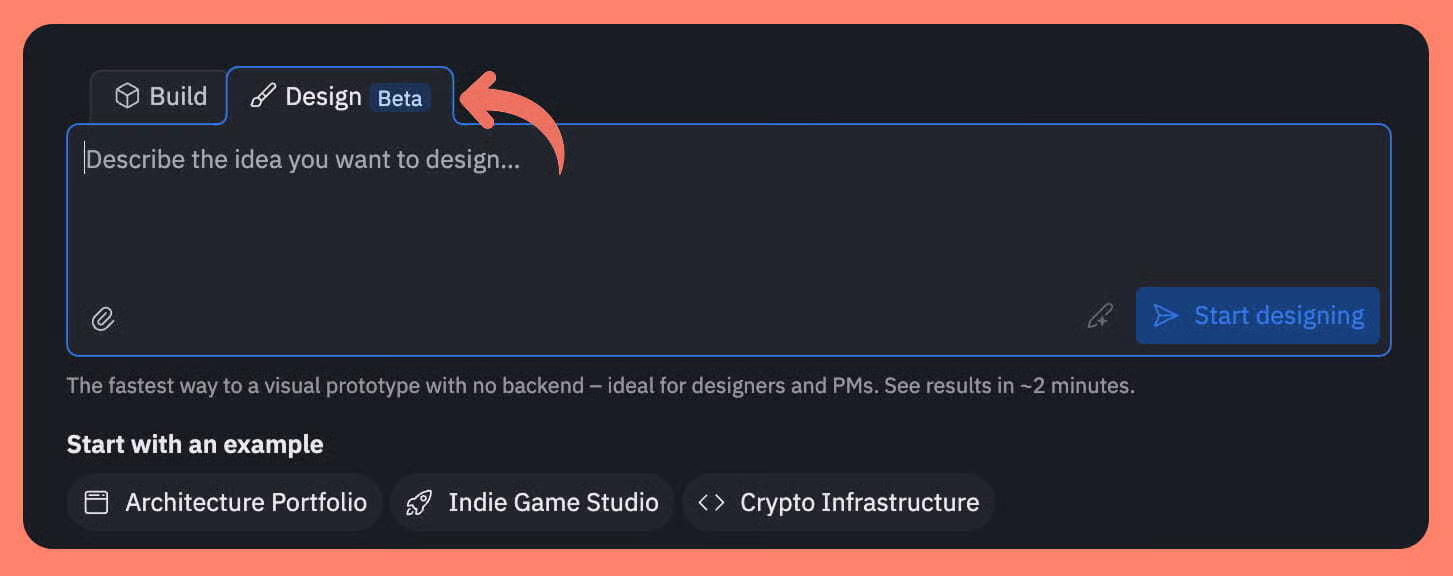
1️⃣ Start Inside Replit: Sign up on Replit and navigate to Home → Design. This is the workspace where you describe the UI you want the agent to build. It handles layout, structure, spacing, and visual hierarchy for you.
2️⃣ Give a Clear, Detailed Prompt: Explain the style, structure, and components you want in your interface. Sample Prompt: “Design a modern, clean fashion website UI with a clear layout, strong visual hierarchy, and intuitive navigation. Keep the style minimal, user-friendly, and mobile responsive. Include a hero section, clear CTAs, and simple content blocks. Provide a polished, premium look without clutter.”
3️⃣ Review and Improve the Design: Replit will generate a complete UI based on your prompt. If you want changes, ask for adjustments. You can refine colors, add sections, improve navigation, or adjust spacing. The agent updates the design immediately based on your instructions.
4️⃣ Use Live Preview for Accuracy: View the interface in Replit’s live preview to check how it looks on desktop and mobile. This ensures your design feels consistent and intuitive across different screen sizes.
5️⃣ Publish or Share the Final Version: Once the UI feels right, click Publish to save or share it. You can send the design to teammates, developers, or clients to move straight into implementation.
The Takeaway
Replit’s Design Agent turns UI creation into a fast, guided workflow. With clear prompts, quick refinements, and live previews, you can produce modern, high-quality interfaces without traditional design tools.
As we prepare more "Growthful" content, we'd love to hear your thoughts on today's edition! Feel free to share this with someone who would appreciate it. 🥰